In this post I am gonna show you how you can go ahead and create a Bootable USB drive by performing simple Commands on Command Prompt.
I know few of you might already know how you can create a Bootable USB Drive. However, I have created this post keeping those people in mind who have just started their Career and wants to do new things and gain knowledge on installation of Operating System using different media or sources.
Without much ado, let me quickly go ahead and show you the step-by-step procedure on how to make a USB Drive Bootable. Just for your information, the Operating System can be installed using the following resource:
- An Operating System Media (CD/DVD)
- A USB Drive.
- Using an Image file.
- Through SCCM (System Center Configuration Manager) Server etc..
The above are different ways that are mostly used to install an Operating System on Laptops or Desktops. In order to create a Bootable USB drive you need to have the following things:
- An Operating System dump version or ISO file.
- USB Drive.
- A laptop or desktop.
Here we go:
1. Run Command Prompt with Administrator Privileges:
- Click on Start.
- Type CMD, right click on CMD and then click on “Run as Administrator” (Shown in the below picture”
Note: I am using Windows 10, so my Start Menu is new. If you are using Windows 8 or Windows 7 your start Menu will be different.

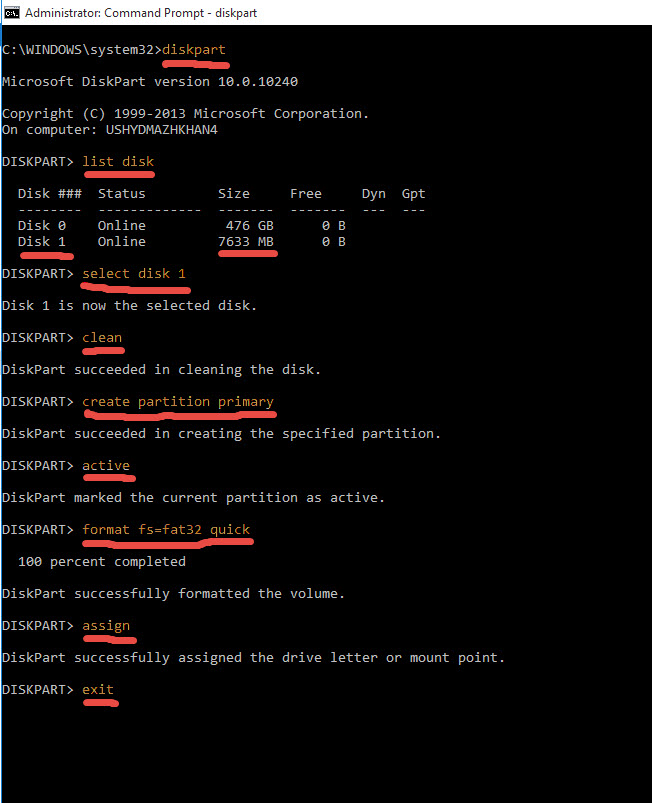
2. Make the USB Drive Bootable by Typing commands in Command Prompt:
- Plugin your USB Drive
- Follow the Commands mentioned, highlighted and underlined in the below picture.
Note: You need to follow the commands in a Sequence.
3. Copy the Operating Files to your USB Drive:
- Now quickly go ahead and copy all the files from the Operating System folder (if your have created any) or from the media. Copy it from wherever you have saved the file.
- Now, paste the same in the USB Drive.
- Plug the USB drive to the Laptop or Desktop where you would like to install the OS or the file which you would like to boot from the USB and ENJOY..!!
Please feel free to let me know if you have any questions by filling the Contact Me form or by commenting on the post.
Feel free to share the post and help others. Share knowledge to Gain knowledge..!!

